


Why Compliance Calendars Are Critical
Managing compliance in a multi-specialty hospital can feel overwhelming. With multiple departments—surgery, radiology, pharmacy, outpatient services, and inpatient care—each facing unique regulatory requirements, keeping track of deadlines, certifications, and audits becomes a complex challenge.
The stakes are high. Missed deadlines can result in fines, operational disruptions, audit failures, or even reputational damage. Traditional tools like spreadsheets, sticky notes, or email reminders are often inadequate, leaving hospitals vulnerable to errors and oversight.
A periodic compliance calendar supported by a robust hospital compliance tracker and renewal tracking system provides structure, centralizes tasks, and ensures that every department stays on top of its responsibilities. This post explores how to create an effective compliance calendar, highlights the role of automation, and shares best practices to help hospitals streamline operations while minimizing risk.

Why Multi-Specialty Hospitals Need a Compliance Calendar
The Complexity of Hospital Compliance
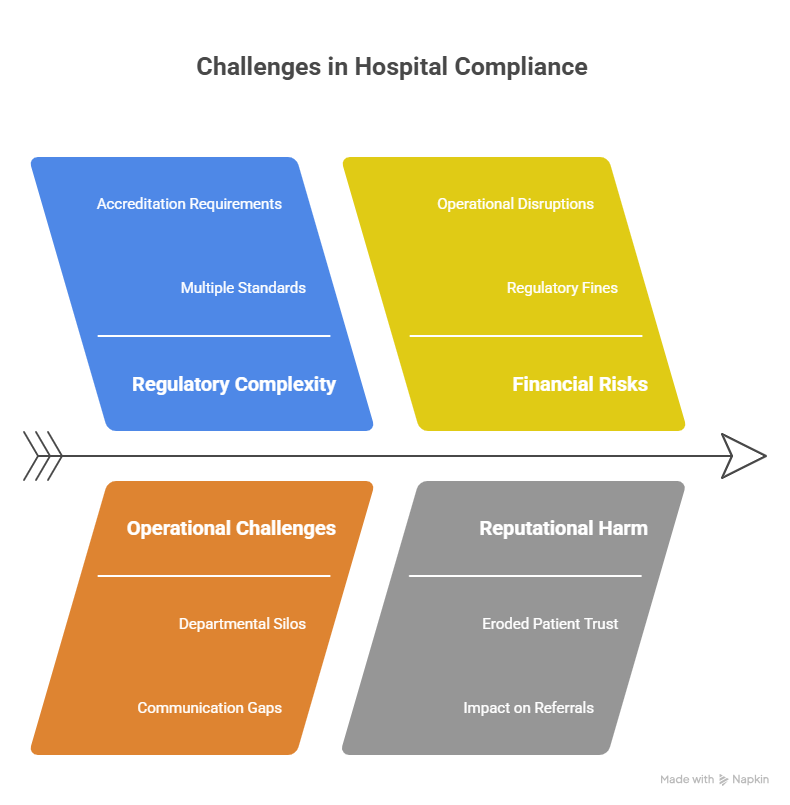
Hospitals operate under a labyrinth of regulations. Each department has distinct compliance obligations, from HIPAA and OSHA standards to accreditation requirements from organizations such as JCI or NABH. Multi-specialty hospitals must also comply with CMS Conditions of Participation, environmental health standards, and internal policies.
Tracking all these requirements manually is not only labor-intensive but also prone to error. Departments may operate in silos, and communication gaps can result in missed deadlines and incomplete documentation.
The Risks of Noncompliance
Noncompliance carries serious consequences:
- Financial penalties: Regulatory fines can reach thousands or even millions of rupees.
- Operational disruptions: Expired licenses or certifications may halt critical hospital services.
- Reputational harm: Compliance failures erode patient trust and can impact referrals.
- Legal exposure: Failure to meet standards may result in lawsuits or regulatory investigations.
Limitations of Manual Tracking
Spreadsheets and email reminders are often inadequate for multi-specialty hospitals. They can lead to:
- Missed or forgotten deadlines
- Fragmented communication across teams
- Limited visibility into the overall compliance status
- Time-consuming audit preparations
A centralized hospital compliance tracker and renewal tracking system address these challenges by streamlining workflow, reducing errors, and providing real-time visibility.
Core Components of a Compliance Calendar
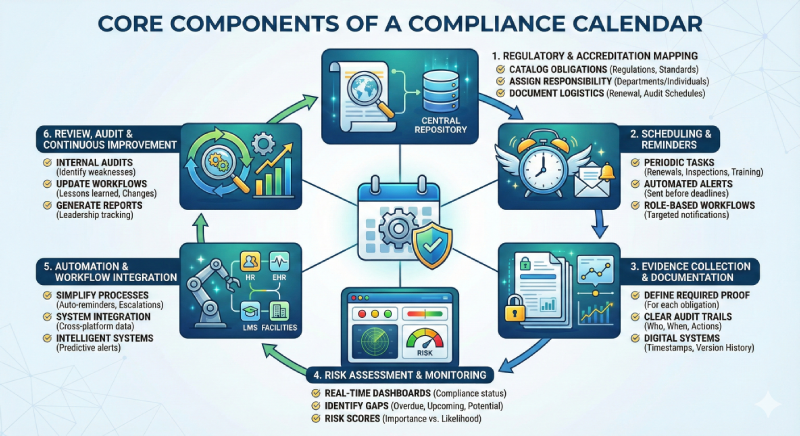
A well-designed compliance calendar requires careful planning. The following elements are essential for ensuring efficiency and effectiveness:
- Regulatory & Accreditation Mapping
Start by cataloging all compliance obligations:
- Identify applicable regulations, standards, and accreditation requirements.
- Assign responsibility to departments or individuals.
- Document renewal frequency, required evidence, and audit schedules.
Maintaining a central repository for policies and procedures ensures that staff always have access to current information, reducing confusion and supporting audit readiness.
- Scheduling & Reminders
Effective scheduling includes:
- Periodic tasks such as license renewals, inspections, training, and audits.
- Automated reminders sent well before deadlines.
- Role-based workflows to ensure each department receives relevant notifications and escalations.
- Evidence Collection & Documentation
Compliance is not only about completing tasks but also about proving them:
- Define the documentation required for each obligation.
- Maintain clear audit trails to show who performed tasks, when, and what corrective actions were taken.
- Use digital systems to capture timestamps, approvals, and version histories for greater transparency.
- Risk Assessment & Monitoring
Ongoing monitoring allows hospitals to focus on high-risk areas:
- Dashboards provide real-time compliance status.
- Identify overdue tasks, upcoming renewals, and potential gaps.
- Assign risk scores to obligations based on regulatory importance and likelihood of noncompliance.
- Automation & Workflow Integration
Automation simplifies complex processes:
- Send reminders, assign tasks, and manage escalations automatically.
- Integrate with HR systems, EHRs, learning management platforms, and facilities management tools.
- Utilize intelligent systems for predictive alerts and risk-based prioritization.
- Review, Audit & Continuous Improvement
Regular reviews keep the system effective:
- Conduct internal audits to identify weaknesses.
- Update workflows and reminders based on lessons learned and regulatory changes.
- Generate reports for leadership to track compliance performance and resource needs.
Step-by-Step Guide to Building Your Compliance Calendar
Creating a comprehensive compliance calendar involves seven practical steps:
Step 1: Conduct a Gap Analysis
Review current practices, tools, and outcomes to identify areas of improvement. Establish baseline metrics for compliance performance.
Step 2: Define Stakeholders and Responsibilities
Assign ownership for each task and establish accountability across departments. Ensure that every team member understands their role.
Step 3: Populate Key Compliance Dates
Include deadlines for:
- License renewals and certifications
- Internal and external audits
- Inspections and preventive maintenance
- Mandatory training programs
Document the required evidence for each task.
Step 4: Set Up Alerts and Reminders
Automate notifications for upcoming deadlines. Include escalation protocols to ensure tasks are completed on time.
Step 5: Establish Documentation Protocols
Maintain digital records for all compliance activities. Standardize formats to simplify audits and include version-controlled repositories for policies and procedures.
Step 6: Train Teams and Implement Workflows
Provide staff with training on tools and workflows. Encourage consistent use across all departments.
Step 7: Review and Refine
Conduct periodic audits to evaluate effectiveness. Adjust reminders, workflows, and task assignments to continuously improve performance.
The Role of Automation in Compliance
Automation is key to modern compliance management.
Benefits
- Reduces human error
- Centralizes tracking across departments
- Simplifies audits through automated evidence collection
- Saves time and administrative effort
Integration with Hospital Systems
- HR Systems: Track credentials, training, and license renewals.
- EHR (Electronic Health Record) Systems: Align clinical compliance tasks with patient data management.
- Facilities Management: Schedule inspections and safety checks.
- Learning Management Systems (LMS): Monitor training completion.
Predictive Monitoring
AI-powered systems can detect patterns of noncompliance, prioritize tasks, and even recommend corrective actions, ensuring proactive management of regulatory obligations.
Common Challenges and How to Overcome Them
- Cost
While automation may require upfront investment, it significantly reduces the financial and operational risks associated with noncompliance.
- Change Management
Staff may resist new tools or workflows. Phased implementation, clear communication, and comprehensive training help foster adoption.
- Integration Challenges
Legacy systems may not integrate easily with new software. Selecting platforms with strong API capabilities and careful planning ensures smooth transitions.
- Complexity Across Departments
Multi-specialty hospitals face diverse compliance obligations. Centralizing governance, clearly defining roles, and using dashboards for visibility helps manage complexity.
Best Practices and KPIs for Continuous Improvement
Best Practices
- Centralize ownership with a dedicated compliance governance team.
- Define clear responsibilities for each task.
- Conduct regular reviews and audits.
- Monitor regulatory changes and update processes proactively.
KPIs to Track
- Percentage of on-time renewals
- Corrective actions completed and time to completion
- Audit results and trends
- User adoption rates across departments
Tracking these KPIs demonstrates the effectiveness of the compliance calendar and helps identify areas for improvement.
Transforming Compliance from Reactive to Proactive
A well-designed compliance calendar, paired with a reliable hospital compliance tracker and renewal tracking system, allows hospitals to shift from reactive to proactive compliance.
By mapping obligations, automating workflows, collecting evidence, and monitoring performance, hospitals can reduce risk, improve efficiency, and ensure continuous readiness for audits.
Ask yourself: Is your hospital prepared to stay ahead of deadlines, minimize risk, and maintain consistent compliance?


